


This is an original nnProject project. The GTA III port to Symbian was made by Shinovon. My contribution was helping to polish it for the Nokia N95: the OpenGL ES 1.1 rendering, fixing textures and testing.
It is in early alpha: expect bugs and low performance.
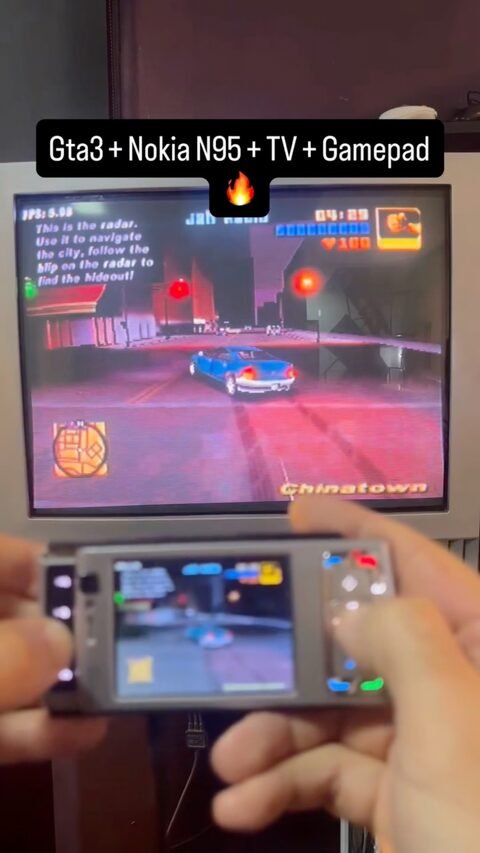
GTA III running on a Nokia N95. It is a port of RE3, a reverse-engineered recreation of Grand Theft Auto III in C++, brought to Symbian (S60 3rd FP1 and Symbian^3 onward).
How to install it
You need a device with a GPU (it will not run without graphics acceleration) and the Symbian PIPS 1.7 libraries. Copy the ORIGINAL files of your PC GTA III to E:\data\gta3 and then install re3.sis.
Download the port (re3.sis) Download PIPS 1.7 dependencies
The game itself is not included: you must use your own copy of GTA III for PC. The first time, texture conversion can take up to 5 minutes; if it hangs longer than that, delete models\txd.img.
How it is built
The code is on GitLab (shinovon/re3-symbian). Import bld.inf in Carbide.c++ with the Symbian^3 or newer SDK, add the PKG file to the SIS Builder and build. The author uses Carbide.c++ 3.2, the Symbian Belle SDK with sbsv2 from the QtSDK and RVCT 4.0, although it should also work with GCCE 4.4.1.
Controls
Keyboard
| Key | Action |
|---|---|
| Left soft key | change camera (Select) |
| Space / Right soft key | pause (Start) |
| Z / 1 / center | accelerate, sprint (Cross) |
| X / 2 | brake, reverse, jump (Square) |
| S / 3 / Backspace | enter or exit vehicle (Triangle) |
| A / 4 | attack (Circle) |
| 5 | look left, cycle weapons (L1) |
| 6 | look right, cycle weapons (R1) |
| 7 | change radio station (L2) |
| 8 | handbrake, aim (R2) |
| 9 | horn (L3) |
| 0 | vigilante, look behind (R3) |
Touchscreen: the bottom-left corner is the left stick (move) and the bottom-right is the right stick (camera).
Project on nnProject Code on GitLab
 Buy me a coffee
  Become a Patron!


